

Process
Modernizing A 20-Year-Old Claims Management Platform.
+ 10% Increase In End-User Productivity
3 Complex Workflows Turned to 1 Product
Summary
Modernize a 20 year old insurance claims management tool — one which had never been touched by a designer — primarily to resolve critical stability issues that were disrupting work.
Goal
Modernizing the product would resolve disruptive stability issues while also allowing for UX improvements that would reduce the time needed to resolve a claim and simplify the onboarding process for new claims analysts.
Business Value
An unrefined requirements gathering process led to substantial rework but the deadline for handoff could only be extended one sprint.
Challenge
Unplanned features were successfully designed and delivered within the adjusted timeline. This success demonstrated the value design could bring to a complex problem and directly lead to the extension of my contract from six months to over two years.
Results
The Context
In 2004, the client released a tool that collated data related to insurance claims to streamline and expedite the review process.
This tool was the Claims team’s primary tool for 20 years and while new features were added during that time, the core experience remained largely unchanged.
By 2023 critical stability issues were starting to emerge and it became clear that a new solution was needed. Thanks to my extensive experience with large-scale modernization projects, I was brought on in 2024 to lead the effort to design the tool’s successor.
History
Decisioning landing page in the original tool. Released c.2004 and in use into 2026.
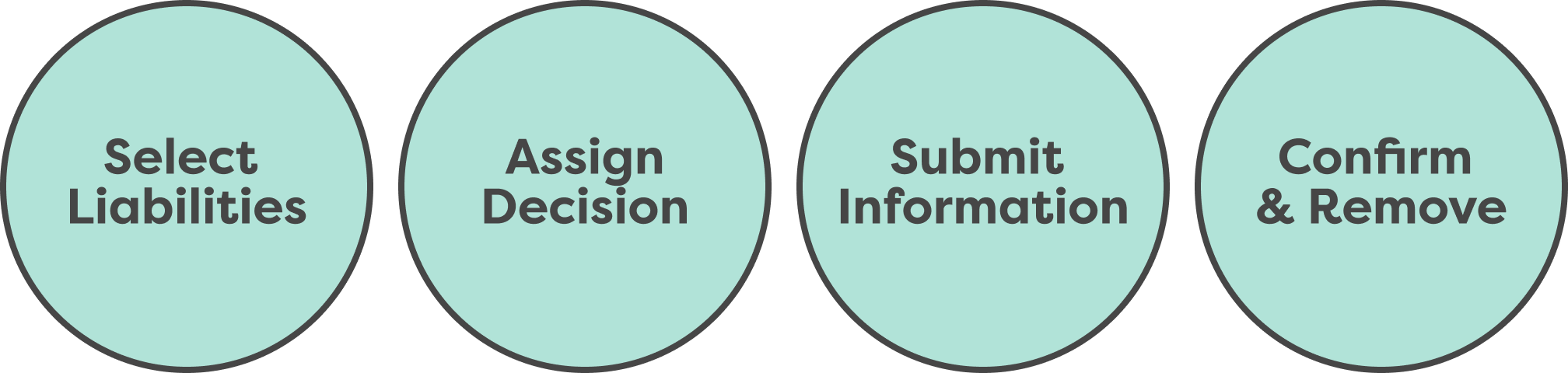
One of the most critical parts of the claims review process is the ‘Decisioning’ stage — the point in the process when an analyst decides whether liabilities associated with a claim should be approved or terminated. The workflows associated with claim termination are generally simpler than approval, so when it came time to design the Decisioning tool my partners and I chose to begin there. Initial requirements gathering work identified four distinct steps to the termination process:
Claims Termination Process
The Problem
After confirming these steps with users and stakeholders I designed the first draft of the terminate workflow and presented it for review. During review, stakeholders realized that a critical feature—something called Business Conditions— had been overlooked during the requirements gathering process. Incorporating this feature necessitated a substantial redesign but the deadline for handoff couldn’t be extended more than one sprint.
The Process
Requirements gathering had been a persistent challenge throughout all the work on the new product, largely due to the complexity and extensive history of the original tool. I was lucky to work with a group of experienced subject matter experts but even they didn’t know all the ins and outs of the system. As a result, we’d regularly uncover pieces of functionality that needed to be incorporated but that hadn’t been accounted for.
First draft of the redesigned Decisioning landing page.
Business Conditions
Prior to making any decisions an analyst has to confirm that they are acting in compliance with the contract associated with a given claim. Due to the complexity of these contracts, maintaining compliance can be a rather daunting task. Business Conditions is a feature released some years ago to help simplify this process.
How do business conditions work?
Contract
When a customer purchases a policy they sign a dense, information-rich contract that stipulates the terms of that policy. This gets broken down into…
Business Conditions
A list of roughly 1,100 individual conditions. Each of these reflects a piece of information that could exist in a contract. Which lets the system show…
Important Information when it’s needed most
If an analyst does something related to a clause in the contract the system can easily display the relevant info without them having to dig through the whole thing.
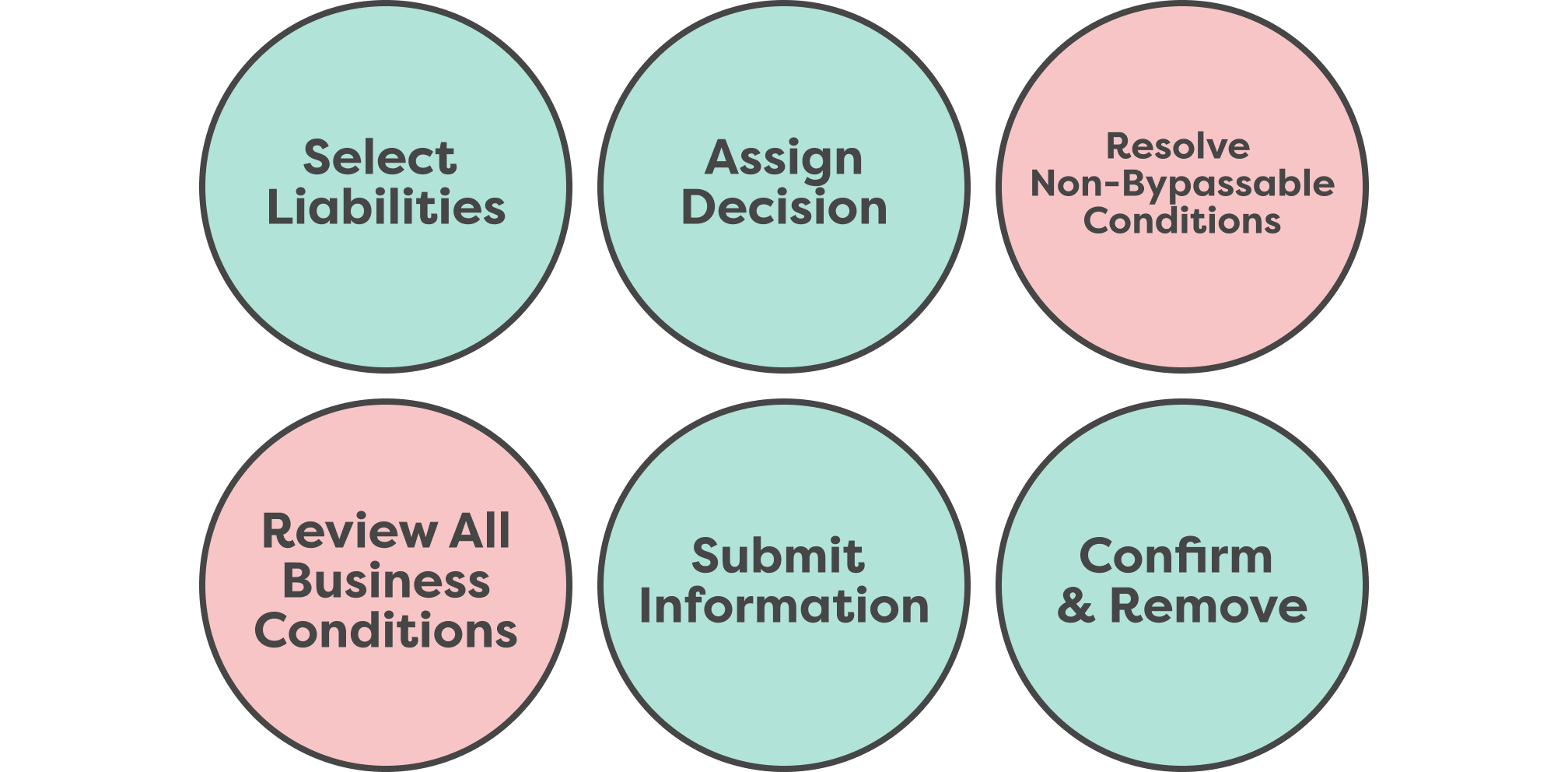
Most of these conditions are purely informational but some of them guide analysts to take follow-up actions to maintain compliance with the contract. The latter can be divided into two categories: bypassable conditions — actions that are suggested but not required — and non-bypassable conditions — actions that are required in order to proceed with the decision-making process.
This added two steps to the process, one of which was simple, one was so complex that changed the entire direction of the project.
What are Non-Bypassable Conditions?
On the surface, they’re pretty straightforward. After an analyst selects a liability then assigns it a decision, depending on the selections the made, they may have to take additional actions to proceed. Those actions are presented as non-bypassable conditions and once they’ve been resolved the analyst can move forward.
The problem is that they only appear after an analyst has started the decision process and they can only be resolved by going to different parts of the the new product.
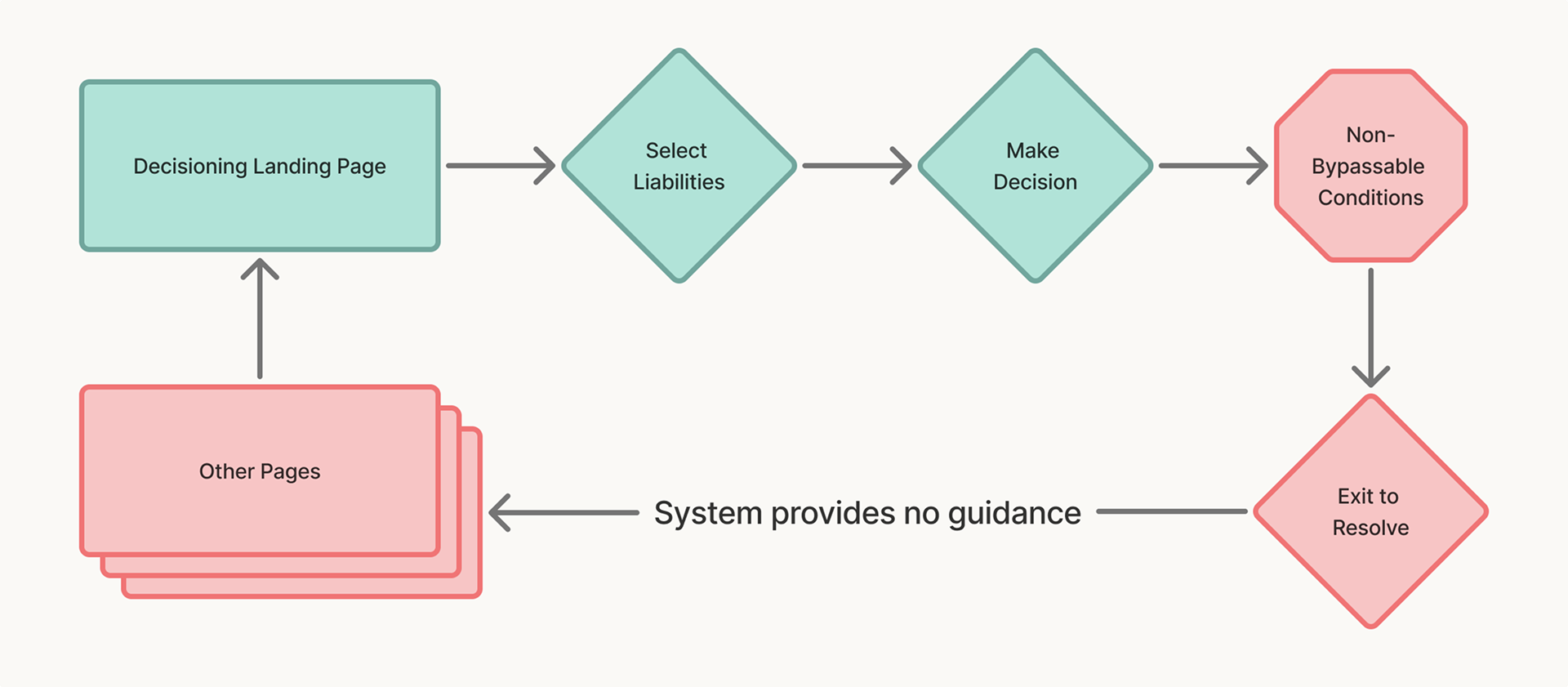
The non-bypassable conditions negative feedback loop.
Further complicating things, the original tool provided no additional guidance on where to go to resolve these conditions. So, once users exited the workflow they had to hunt down the source of the problem on their own which, naturally, they didn’t particularly enjoy.
My first attempt to address this focused on taking the pain out of the process. If non-bypassable conditions were triggered they’d appear as a structured list on the landing page. Each condition would have a corresponding link that would direct analysts to the place they needed to go to solve the issue.
First draft of non-bypassable conditions resolution tool.
The stakeholders loved the idea of the links but were very resistant to presenting them this way, largely because the list would only be retained for the duration of the current session. Even though this was a marked improvement, they were concerned that it didn’t sufficiently minimize the risk that analysts would need to restart the process.
In an earlier phase of the project I’d proposed the idea of a persistent right rail to contain another group of globally useful tools but, due to scope constraints, the engineering team rejected the proposal. Given the need to retain the status of non-bypassable conditions across sessions, and to do so in a place that could be accessed from anywhere inside the platform, I decided to pitch the idea again.
I sat down with my engineering partners to reexamine the concept and address any lingering scope concerns. They were initially hesitant but, after extensive back and forth, we arrived at a solution they felt comfortable with.
Return of the Right Rail
First version of the “Conditions” panel in the right rail.
This first version of the right rail solved many of the critical issues we’d encountered, but I but felt there was more room to improve before stakeholder review. Specifically, I wanted to see if it was possible to further reduce the need to navigate away from the experience while resolving non-bypassable conditions.
Clicking on a non-bypassable condition in tier 1 opened this level where users would be presented with the input fields they needed to fill out to resolve the condition.
I hypothesized that if we could identify the places users needed to go to resolve conditions, we could also identify the specific fields that needed data inputs. If that were possible, we could present them as a form in a 2nd tier of the right rail. Engineering confirmed it would be possible and, with their blessing, I presented the idea for stakeholder review where the design was enthusiastically approved.
What about the other Business Conditions?
This resolved the primary issues presented by non-bypassable conditions but the question of how to review other conditions was still open. Further exploration of the problem exposed an interesting point — while analysts needed to review business conditions prior to making a decision, they also wanted to be able to access them at any other time in the process. Building off that idea, I worked to refine the right rail into a place to house all conditions.
Final two visions for the Conditions Panel, A-B tested with users.
Displaying all relevant conditions here made it much easier for analysts to engage with them throughout the claims analysis process and incorporating a filter to highlight non-bypassble conditions allowed them to address those conditions when it was most convenient for them.
Unified Conditions panel.
Conditions panel after non-bypassable conditions filter has been triggered.
Conditions panel after non-bypassable conditions have been resolved.
Seamlessly integrating all of these features in the landing page and right rail reduced the complexity of the overall workflow and gave analysts more agency over how they wanted to approach their work
The Results
Multiple critical processes were seamlessly integrated in a way that increased efficiency, reduced the rate of reported errors, and drastically improved user satisfaction.
Despite unforeseen complications, the work was still handed off within the adjusted time frame.
The requirements gathering process was refined and improved as a direct result of the frustrations we encountered and the ways we managed to resolve them, which made future projects run much more effectively.
The success of this effort and others directly lead to increased funding for design on this project, resulting in an extension of my contract and an expansion of the team.